ELEGOO Saturn 4 Ultra 16K Beginner Setup: What Else Do You Need?
The printer is only the first piece of a resin-printing workflow. Here is what you actually need to start, what the Saturn already includes, what can wait, and where a wash-and-cure station such as the Mercury Plus V2.0 fits.
Prices and bundles change. Verify the exact package contents and regional listing before ordering.
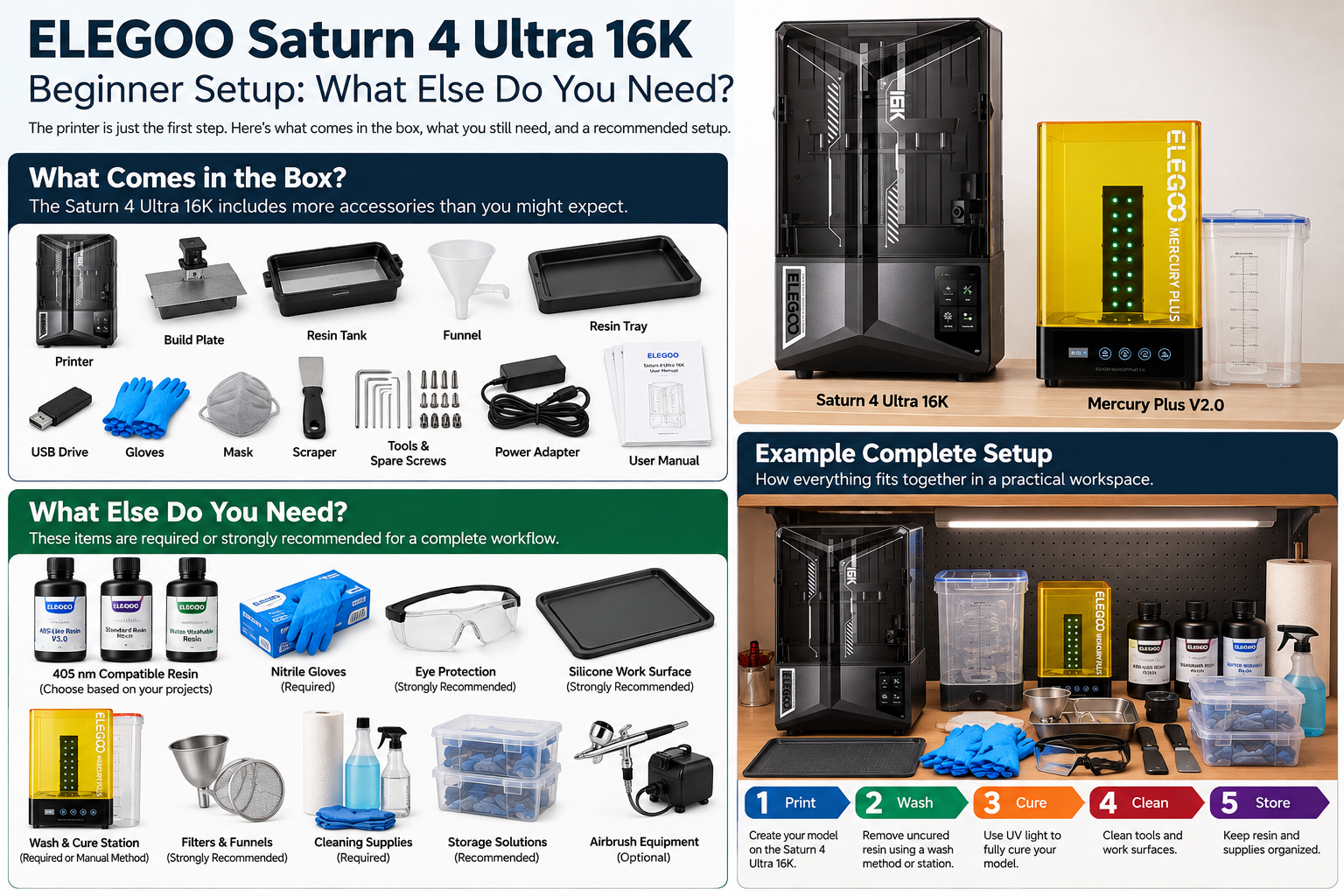
Saturn 4 Ultra 16K
This guide is being built around a real Saturn 4 Ultra 16K setup rather than pretending every product was personally tested.
Mercury Plus V2.0
The actual companion wash-and-cure unit in this setup is the Mercury Plus V2.0.
Buy only what solves a real need
Optional finishing gear belongs later unless your first projects genuinely require it.
What comes with the Saturn 4 Ultra 16K?
ELEGOO's current product materials describe the Saturn 4 Ultra 16K as a 10-inch 16K monochrome-LCD resin printer with automatic leveling, smart tank heating, monitoring features, and tilt-release technology. Package contents and promotions can vary by region or bundle, so check the exact listing before ordering.
What you still need
| Item | Priority | Why |
|---|---|---|
| 405 nm-compatible resin | Required | The Saturn uses 405 nm UV-curable resin. |
| Nitrile gloves | Required for uncured-resin handling | Creates a repeatable protective workflow rather than relying on a small included supply. |
| Eye protection | Strongly recommended | ELEGOO's current resin safety information calls for eye/face protection. |
| Washing method | Required | Fresh prints retain uncured resin that must be removed. |
| UV-curing method | Required | Post-curing completes the normal resin-print workflow. |
| Silicone mat / containment surface | Strongly recommended | Makes drips and cleanup easier to control. |
| Filters / funnels | Strongly recommended | Useful when returning resin and keeping debris out of the vat. |
| Cleaning and storage supplies | Required / recommended | Keeps resin tools separated from ordinary household use. |
1. Start with one suitable resin, not a shelf full of bottles
ELEGOO's beginner guidance states that its resin printers use UV light at a wavelength of 405 nm. That gives you the first compatibility check: choose a resin intended for 405 nm LCD/MSLA printing and then choose the formulation for the models you actually plan to make.
For a new setup, one or two suitable bottles make more sense than buying a large color collection before you know what you enjoy printing.
Browse ELEGOO resin2. Build a repeatable protective routine
ELEGOO's current photopolymer-resin safety information warns that uncured resin can irritate skin and eyes and instructs users to wear protective gloves and eye/face protection. A proper box of nitrile gloves and suitable eye protection therefore belongs in the startup budget.
3. Decide how you will wash and cure before the first print
A dedicated wash-and-cure machine is convenient, but a specific branded station is not mandatory. What is mandatory is having a suitable washing process and a suitable UV-curing process for the resin workflow you are using.
In this setup, the actual owned companion unit is the ELEGOO Mercury Plus V2.0 .
Check Mercury Plus V2.0 details4. Give the resin workflow more space than the printer footprint
Do not measure only the machine. You also need room for uncured prints, gloves, tools, washing, curing, cleanup materials, and temporary resin-handling items.
A simple layout is to create a resin/dirty zone for the printer, washing, resin, and uncured parts, with a separate clean zone for fully cured models, painting, computers, and ordinary desk items.
5. What can wait?
An airbrush, a giant resin collection, premium tool kits, extensive spare parts, and elaborate storage furniture can all be useful later. None of them is required for the Saturn to complete its first successful print.
Start with the workflow. Print a few models. Then let real experience determine which upgrades are worth buying.
What I would buy first
Printer → one suitable resin → nitrile gloves and eye protection → washing method → curing method → silicone work surface → filters and cleanup supplies → organized storage.
That sequence gives you a complete workflow before optional hobby upgrades begin consuming the budget.
Bottom line
The Saturn 4 Ultra 16K does not require a room full of accessories, but the printer alone is not a complete resin-printing workspace. Buy the material, protective equipment, post-processing method, and cleanup setup first. Let everything else earn its place later.
GearClarity Tech's rule: know what the job requires before you pay for the gear.